
If you're experiencing issues with WhatsApp Voice or have questions about the product, please follow the steps below to raise a support request via the Gupshup support portal.
✅ Step-by-Step Guide
Step 1: Open the Support Request Form
Go to the Gupshup Support Portal:
👉 https://support.gupshup.io/hc/en-us/requests/new
Step 2: Enter Your Email Address
In the "Your email address" field, enter the email ID that will be used for all future communication and follow-ups.
Step 3: Add a Subject Line
Provide a short and relevant subject that summarizes your issue or query.
Step 4: Select the Topic
From the "Topic" dropdown menu, select:
WABiz: WhatsApp Voice
Step 5: Choose the Right Subtopic
From the "Subtopic" dropdown menu, select the most appropriate option:
-
WhatsApp Voice Issue – for technical problems or disruptions in service
-
WhatsApp Voice Query – for questions, clarifications, or usage-related doubts
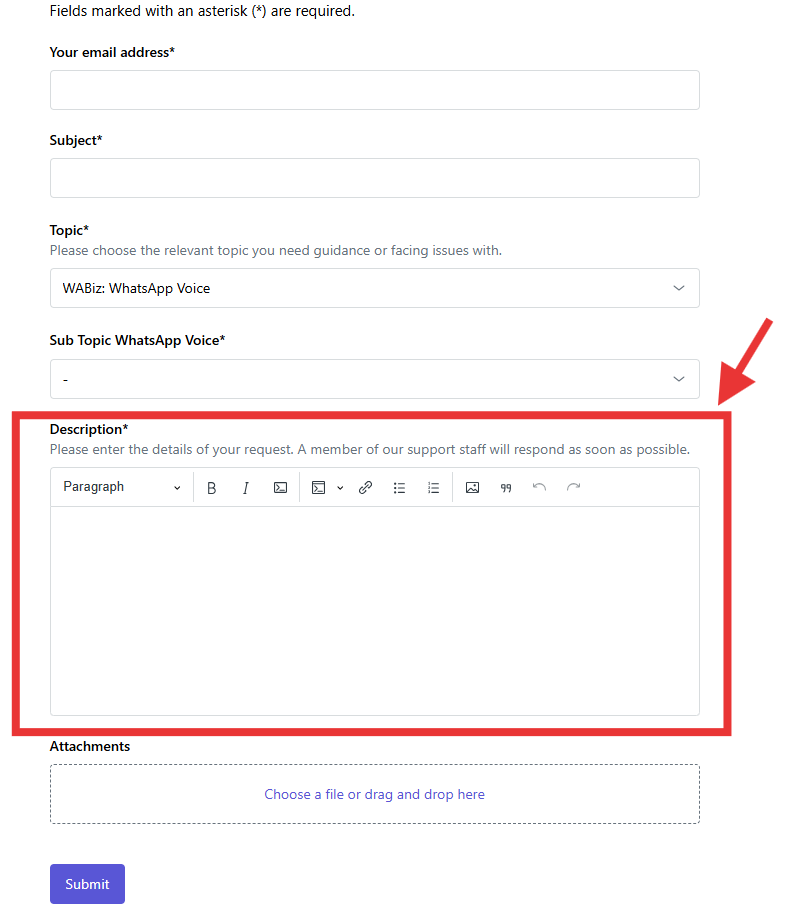
Step 6: Enter the right Description
- Enter the correct and right description for the problem/issue/question issues in descriptive manner, include all the required and necessary details for debugging
Step 7: Add Attachments
- Add attachments/screenshots if any
Step 8: Submit Request
- Click on “Submit” for submitting the request/create a support ticket.
✅ Additional Tip
If you sign in to the portal before submitting your request, you’ll be able to track the status of your open and closed tickets linked to your email.
Comments
0 comments
Please sign in to leave a comment.